Documentation
What is the eIOU Protocol?
The eIOU protocol is a revolutionary way to handle digital transactions. It combines the simplicity of traditional IOUs with the power of modern technology to create a seamless, secure, and efficient system for transferring value.
Protocol Commands
Contacts
- My Info (eiou info)
- Add Contact (eiou add)
- Accept Contact (eiou add)
- View Contact (eiou viewcontact)
- Update Contact (eiou update)
- Delete Contact (eiou delete)
- Search Contacts (eiou search)
Transactions
- Send eIOU (eiou send)
- View eIOUs (eiou viewbalances)
- View Transaction History (eiou history)
Settings
- Help (eiou help)
- View Settings (eiou viewsettings)
- Update Settings (eiou changesettings)
- Generate Wallet (eiou generate)
Commands Detail
The owner of the account (user) interacts with other users (contacts) in the following ways:
👥 Contacts
My Info
Outputs the user information including:
- Their locators
- Their pubkey
- Their balance
- Their balance detail
Examples:
eiou info eiou info detail Add Contact
Add a contact on the local database and send a request for the contact to do the same. If contact has valid eIOUs, add them to the local database (aka sync function).
Example:
eiou add 123address Alice 0.1 10 USD Parameters: Address/URI, Name, Fee (percent), Main Nominal Credit, Main Currency (Should be USD until 'Foreign Currencies' feature)
Accept Contact
Accept a create contact request and add the contact back. Users can send funds to users who are not contacts (through trusted contacts) but cannot accept each other's credit, or interact directly in Peer to Peer requests.
Example:
eiou add 123address Bob 0.2 20 USD Parameters: Address/URI, Name, Fee, Main Nominal Credit, Main Currency (Should be USD until 'Foreign Currencies' feature)
View Contact
Read contact information from the local database.
Examples:
eiou viewcontact 123address.tor eiou viewcontact Alice Parameters: Address/URI or Name
Update Contact
Update any information about contact, except Address/URI. Update 1 field at a time, unless All is specified, in which all must be presented in the following order: name, fee (percent), main nominal credit.
Examples:
eiou update 123address name Alice eiou update 123address all Alice 0.1 100 Parameters: Address/URI, Type (name → name, fee → fee (percent), credit → Main Nominal Credit, all → all), Value(s)
Delete Contact
Remove contact from the local database, and delete any eIOUs associated with them.
Example:
eiou delete 123address.tor Parameters: Address/URI
Search Contacts
Lookup contact by name, or return all contacts.
Examples:
eiou search eiou search Alice Parameters: Name (optional)
Returns: Address/URI, Name, Fee (percent), Main Nominal Credit, Main Currency
💸 Transactions
Send eIOU
Transfer a value to a contact. The user will first check if they can send an eIOU directly, and if there is not enough credit available, will try to route the transaction through P2P (Peer to Peer).
If the user is a contact:
- Check in the database for contact's credit limit with the user, subtract the outstanding eIOUs and add outstanding eIOUs from contact.
- If amount is less than credit limit, sign the transaction and send it
- If no, send a peer to peer request
- Once we have a valid route, sign and send the transaction to first peer
- Final peer will send confirmation back towards first peer
- Otherwise, transaction expires after x seconds
If the user is not a contact:
- Send a peer to peer request
- If we have a valid route, sign and send the transaction to first peer
- Final peer will send confirmation back towards first peer
- Otherwise, transaction expires after x seconds
Examples:
eiou send Alice 100 USD eiou send 123address 100 USD Parameters: Name or Address/URI, Amount, Currency
View eIOU Totals
Queries the local database for eIOUs, and returns the total for any outstanding balances. If query is submitted, search by that before returning eIOU totals. Else, return all eIOU totals.
Examples:
eiou viewbalances eiou viewbalances Alice eiou viewbalances 123address View Transaction History
Queries the local database for eIOUs, can search by address, nickname, date; or return all. Results can be sorted by address, date, amount. Default sort order is date descending. If query is submitted, search by that and return all eIOUs. Else, return all eIOUs.
Examples:
eiou history eiou history Alice eiou history 123address ⚙️ Settings
Help
CLI version only. Displays all available commands and how they work, writing help [command name] will display help information about the command name.
Command names: info, add, viewcontact, update, delete, search, send, viewbalances, history, help, viewsettings, changesettings, generate
Examples:
eiou help eiou help create View Settings
Shows the settings:
- Default fees
- Default currency (currently hardcoded to USD)
- LocalHost/Network Connection Only (API / GUI version, respectively)
- Disable Token (API only)
- Default Peer to Peer Expiration
- Maximum Peer to Peer Level (default 6)
Example:
eiou viewsettings Update Settings
Change settings for user. Choose one of the following:
- Default fees
- Default currency (currently hardcoded to USD)
- LocalHost/Network Connection Only (API / GUI version, respectively)
- Disable Token (API only)
- Default Peer to Peer Expiration
- Maximum Peer to Peer Level (default 6)
Then through the CLI change the value to what is desired
Example:
eiou changesettings Generate Wallet
Create a new passphrase and generate a keypair for it, then provide a passphrase to the user. Using composer: bitwasp/bitcoin
Example:
eiou generate 123address User Stories
The eIOU Wallet enables seamless value transfer through a network of trusted connections. Each user can create their own digital tokens (like "Alice-USD") that represent their creditworthiness. When you connect with someone, you decide how much of their tokens you're willing to hold, creating a web of trust that enables instant transfers.
Direct Transfer
Alice wants to send Bob $100 in Alice-USD tokens
Alice creates and sends her own Alice-USD tokens to Bob.
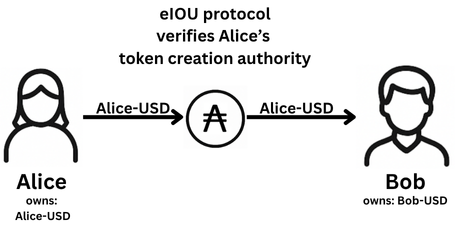
- Alice initiates a transfer of $100 Alice-USD tokens to Bob
- The eIOU Protocol verifies Alice's token creation authority
- Bob receives $100 worth of Alice-USD tokens instantly
- Transaction is saved by both users privately
Alice wants to send Bob $100 in Bob-USD tokens
Alice has $100 worth of Bob-USD tokens in her available credit.
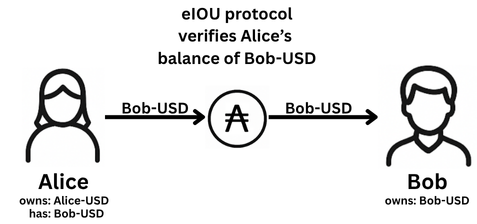
- Alice initiates a transfer of $100 Bob-USD tokens to Bob
- The eIOU Protocol verifies Alice's balance
- Bob receives $100 worth of his tokens instantly
- Transaction is saved by both users privately
Multi-hop Transfer
Alice wants to send Carol $100 via Bob using their respective tokens
Alice wants to send money to Carol, but they don't have a direct connection. Bob, who has credit with both Alice and Carol, acts as an intermediary. Bob can charge a small fee for taking on the risk of routing the transfer.
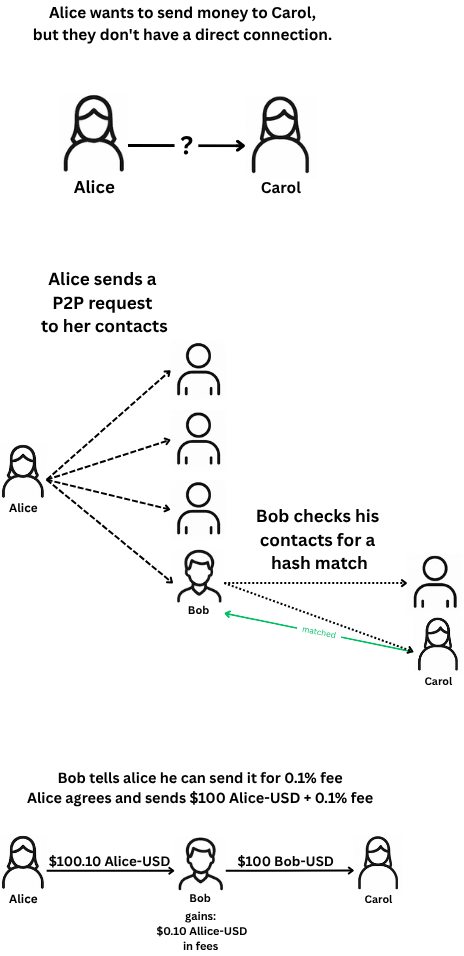
- Alice sends a Peer to Peer request searching for someone who can send $100 USD to Carol
- Bob calculates the hash for each of his contacts, checking if any match the hash Alice sent
- Bob finds a match, and informs Alice he can send it for a 0.1% fee
- Alice initiates a transfer of $100.10 Alice-USD tokens to Bob
- Bob receives $100.10 worth of Alice-USD tokens
- Bob then sends $100 Bob-USD tokens to Carol
- Carol receives $100 worth of Bob-USD tokens
- All transactions are saved privately by each participant
Business Use Cases
Supplier Payment Chain
A manufacturer needs to pay multiple suppliers in a chain. Each supplier can create their own tokens (e.g., SupplierA-USD, SupplierB-USD).
- Manufacturer initiates payment to final supplier
- eIOU Protocol automatically splits and routes payments
- Each supplier receives their portion in tokens they are willing to accept
- All transactions are settled simultaneously
- Suppliers can settle with each other through traditional means (bank transfers, trade credit, etc.)
Retail & Online Payments
Point of Sale Integration
A café owner wants to accept eIOU Wallet payments alongside traditional payment methods.
- Payment terminal is integrated with eIOU Wallet
- Customer scans QR code or taps their phone
- Payment is processed instantly through the network
- Merchant receives funds in tokens they are willing to accept, including Café-USD tokens
- Merchant can sell Café-USD tokens same as they would use gift cards
Settlement Options
Flexible Settlement Methods
When it's time to settle debts in the eIOU network, users have multiple options to transfer value back through the network.
- Bank transfers can be used to settle debts with any connected user
- Cash payments can be made in person and recorded in the network
- Goods and services can be exchanged to settle debts
- Work or labor can be provided to settle outstanding balances
- Users can choose how to maintain the credit relationship for future transactions
Ready to Get Started?
Try out the eIOU protocol with our interactive demos and start experiencing digital cash today.